
A practical guide to spotting which pages on your website are worth optimising, and knowing exactly what to do with them, based on real client data.
What is Google Search Console and why does it matter for traffic?
Most purpose-driven businesses invest real thought into their websites. Good copy, considered design, a clear story. And then they wonder why traffic isn't growing.
The frustrating thing is that the answer is usually sitting right there in Google Search Console, waiting to be found. Do you need to write more content? Maybe not. Maybe you just need to know which specific pages are almost ranking well, and what's holding them back.
That's what this guide is for.
If you're newer to SEO and want a broader picture first, this article on SEO for people who don't want to be SEO experts covers the fundamentals, including a quick intro to GSC, before you come back here and put it to use.
The three GSC metrics that matter: impressions, position, and CTR
Every time your website appears in Google search results, GSC records it. Over time, you build up a detailed picture of which pages Google thinks are relevant, where you're appearing, and whether people are actually clicking through.
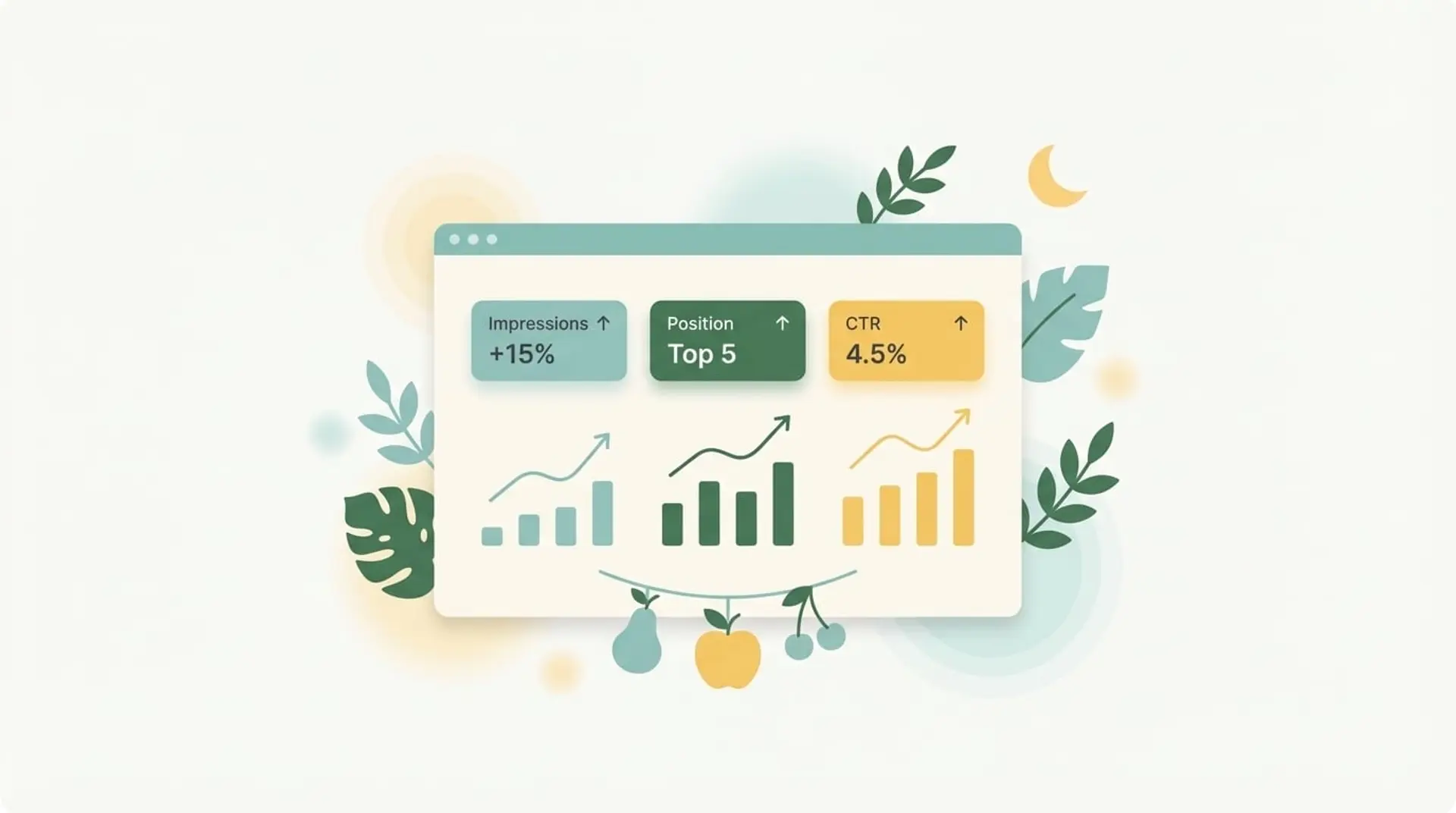
The three numbers that matter most are impressions, position, and CTR (click-through rate).
Impressions
Impressions measure how often Google is showing a page in results. High impressions means Google considers your page relevant for a topic. Low impressions means either the topic gets very little search volume, or Google doesn't think the page is strong enough to show.
Position
Position tells you where you're appearing. And the relationship between position and clicks is not linear. It's steep.
According to research from First Page Sage, the top-ranked organic result receives around 39.8% of clicks. Position 4 drops to around 7–8%. By position 9 or 10, you're looking at under 2%. Smart Insights corroborates this, noting that while the top three positions carry double-digit click-through rates, they fall rapidly beyond that.
It's worth noting that these benchmarks are shifting. AI Overviews are now changing how clicks are distributed, with some studies showing position 1 CTR declining by as much as 32% as users engage with AI-generated answers at the top of the page. The principle still holds. Higher ranking means more clicks. But the gap between the top spots and the rest is widening in some cases, making it even more important to close the ground on pages stuck at positions 5–15.
Click-through rate (CTR)
CTR tells you what happens when people see you. If you're getting impressions but few clicks, something is putting people off. That could be your ranking, or it could be the way your result looks: the title and description people see before they click.
Knowing which of those two problems you're dealing with completely changes what you do next.
How to filter Google Search Console to find opportunity pages
Before you start, set the date range to the last three months. Long enough to be meaningful. Short enough to reflect how your site is performing right now.
In GSC, go to Performance > Search Results. Toggle on impressions, clicks, search position, and average CTR. It should look something like this:
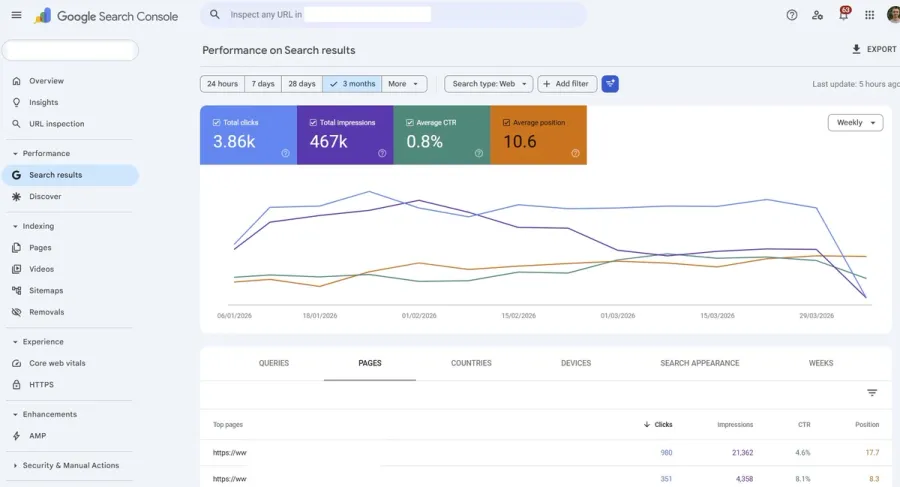
Then apply two filters and a sort:
- Impressions to roughly 0.5-1% of your total quarterly impressions. For a site getting 400k impressions per quarter, that's around 2,000. Anything below this is likely too niche to be worth prioritising right now). Don't go below 100 impressions regardless, or you're chasing pages with almost no search volume behind them.
- Average position greater than 4 (outside this range you're either already doing well or too far back to close the gap quickly)
- Sort the position column from lowest first, so you should see pages which are currently near to the top of the search result pages
Now switch to the Pages tab rather than the Queries tab. The Queries tab shows every individual search term that triggered an impression, which sounds useful, but in practice means hundreds of fragmented rows, each telling you only part of the story. The Pages tab shows you how each URL is performing across all the searches it ranks for, which makes it immediately actionable. You know exactly which page to go and work on.
What you're left with is your candidate list.
How to read your GSC data and spot what needs fixing
Not everything on that list deserves equal attention. Before looking at the numbers, which types of pages are showing up?
A service page or a piece of content that drives enquiries is worth optimising. An about page or contact page appearing on the list could be a quirk rather than an opportunity. If a contact page is showing up with significant impressions, that may warrant investigation rather than something to optimise.
You know what your pages are for, so use that as your first filter before the combinations below. For the pages that do make sense to act on, here's how to read what you're seeing:
High impressions + position 4–15 + low CTR
This is your best opportunity. Google already thinks the page is relevant and is showing it regularly. People just aren't clicking. The problem is almost always the snippet (the title tag and meta description) rather than the content itself. Fix that before touching anything else.
High impressions + position 1–4 + low CTR
The ranking is fine. The snippet is weak. Rewrite the title and description. The content doesn't need to change.
High impressions + position 15+
Google sees some relevance but the page isn't strong enough to rank higher. This needs more work: better content depth, stronger internal linking, possibly a structural rethink. This takes more effort and may be a slower return.
High impressions + position 5–15 + high CTR
The snippet is already working. People click when they see it. The only thing holding this page back is its position, so the focus is entirely on improving the ranking: stronger content, better internal linking, more depth. These pages are worth prioritising because every position gained multiplies clicks at a rate you've already proven.
Low impressions + strong position
Niche topic or low search volume. Not much to gain here unless the topic is commercially important to you specifically.
What impression, position, and CTR thresholds should you aim for?
These aren't universal rules. They scale with your site's total impression volume. For a site generating around 400–500k impressions per quarter, these work well as starting points:
| Signal | Threshold | What it means |
|---|---|---|
| Impressions | 2,000+ | Worth investigating |
| Impressions | 5,000+ | Prioritise |
| Impressions | 10,000+ | Treat as urgent |
| Position | 4–15 | Sweet spot for improvement |
| CTR | Below 2% | Snippet likely needs work |
| CTR | Above 3% | Snippet is working, focus on ranking |
A rough rule of thumb: your impression threshold should be roughly 0.5–1% of your total quarterly impressions. That way the filter scales to the actual size of your site, rather than you either ignoring useful pages or chasing noise.
Is it a ranking problem or a CTR problem? How to diagnose the difference
Once you've spotted a candidate page, you need to work out whether it's a ranking problem or a snippet problem.
To diagnose, click into the page in GSC and look at the queries tab for that specific URL.
If the queries driving impressions closely match what the page is about, the content is relevant and Google knows it. The issue is likely the snippet. Focus on rewriting the title tag and meta description.
If the queries feel loosely related, if people are searching for something slightly different from what the page actually covers, the content needs to be strengthened to better match those searches.
One thing worth checking before you do anything: a very low CTR doesn't always mean the snippet is bad. Sometimes it means the query intent doesn't match what the page is offering. If a page is ranking for searches that are navigational (people looking for a specific place or brand) or purely academic (students researching a topic), low CTR is expected. Rewriting the snippet won't fix it. The underlying issue is that the page is surfacing for the wrong searches.
So before acting on any candidate, ask yourself two things:
- Is this a ranking problem, or a snippet problem?
- Does ranking better for this actually matter to my business?
That second question is easy to skip, and it shouldn't be. A blog post ranking better for an informational query is a modest win if it doesn’t help your business or SEO strategy. A services page ranking better, one that sits early in a buying journey, is significantly more valuable. Always weigh business potential alongside the raw numbers.
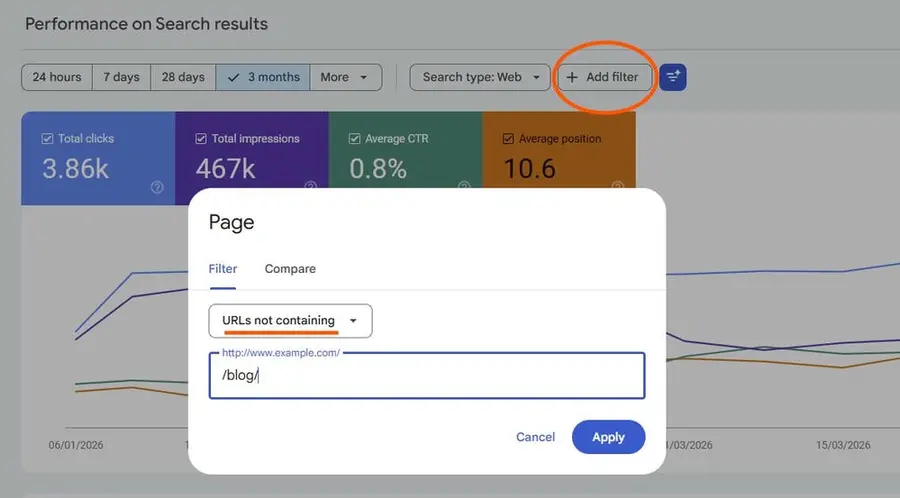
Tip: Try add a filter to focus on commercial pages by removing your educational content like blogs or case studies: Add filter > Page > URLs not containing > “/blog/” (or “/portfolio/”, “/articles”, etc.). See the example screenshot below:
How to fix low click-through and improve your Google Search position
If it's a snippet problem:
- Rewrite the title tag to be more specific and compelling. Put the primary keyword closer to the front
- Rewrite the meta description to give people a reason to click. What will they get from this page that they won't find anywhere else?
- Look at what the competing snippets say for that search. If everyone else is vague, being specific wins
If it's a ranking problem:
- Check whether the page content actually addresses the searches driving impressions. Is it giving people a thorough, useful answer?
- Strengthen internal linking. Are other relevant pages on your site pointing to this one? Internal links signal importance to Google
- Consider whether the page needs to go deeper on the topic, or be restructured to answer commonly asked questions more clearly
- Does the page need technical improvements like structured data, page performance or alt text?
If it's both: Start with the snippet. It's faster, cheaper, and you'll see the impact within a few weeks as it changes on Google instantly. Then tackle the content.
A real example: diagnosing and fixing underperforming pages in GSC
Here's how this plays out in practice. The data below comes from a real client, a purpose-driven B2B business in the sustainability sector, with the specific pages anonymised.
| Page topic | Impressions | Position | CTR | Diagnosis |
|---|---|---|---|---|
| Broad industry topic article (educational) | 34,064 | 7.7 | 0.78% | Top priority. Huge volume, awful CTR. Snippet problem. |
| Niche technical topic blog article | 12,520 | 6.1 | 0.57% | Urgent. Good position, almost no clicks. Snippet problem. |
| Industry topic article with a bit more business potential | 7,930 | 4.5 | 0.47% | Closest to top. A snippet fix could push it over and improve clicks. |
| Niche application of service article | 7,649 | 6.6 | 0.81% | Worth optimising once the top three are done. CTR is a little better. |
| Niche technical topic blog article | 7,526 | 6.6 | 0.45% | Strong volume and position, optimise position and CTR. |
| Sustainability article topic | 4,175 | 7.7 | 0.38% | Very low CTR for the volume. Snippet issue, but also position needs optimising. |
| A resource page that houses a lead magnet | 4,358 | 8.3 | 8.05% | CTR is excellent. Only lever is improving ranking which will really multiply clicks and therefore site traffic. |
| About page | 3,903 | 5.5 | 2.50% | Commercial page with decent CTR, though low business potential. Investigate which queries are driving this and whether it’s worth optimising. |
| Key commercial page | 1,610 | 6.8 | 0.12% | Commercial page with almost no clicks. Investigate which queries are driving this |
| Specific service landing page | 30,185 | 16.7 | 0.5% | Huge impressions but poor position and CTR. Deeper content work needed on this page to raise its position, but massive potential. |
The first page on the list is the obvious place to start. Over 34k impressions at less than 1% CTR means Google is showing it constantly and almost nobody is clicking. That's almost certainly a title tag problem, likely something generic where it could be specific and useful, but we need to look into the queries page to know.
The resource/lead magnet page tells the opposite story. 8% CTR at position 8 is strong. The snippet is clearly working. The only thing worth doing here is strengthening the page's ranking, which means improving the content and building internal links to it.
The commercial page is the one worth pausing on. It has low impressions and almost no clicks, but commercial pages warrant investigation regardless. What queries are driving those 1,610 impressions? If they're loosely matched to the page's intent, the content likely needs rethinking. If they match well, the snippet needs work.
Quick reference guide
- Snippet opportunity: High impressions, position 5–15, CTR below 2%. Quick fix, fast return.
- Ranking opportunity: High impressions, position 5–15, CTR above 3%. More effort, but the click rate is already proven. Every position gained compounds.
- Snippet problem signs: Position is decent, CTR is very low, queries closely match page topic
- Ranking problem signs: CTR is reasonable, position is poor, or queries feel loosely matched to the page
- Fix order: Snippets first. They're faster and cheaper. Then tackle content.
- Commercial pages first: A services or solutions page outranks a blog post in terms of business value. If a commercial page makes your candidate list, jump the queue.
Build in SEO from the start
There's no point optimising for search traffic if the site people land on doesn't convert.
Every website I build at Lumin is search-optimised from the start. Structure, metadata, and content are all considered before launch, not bolted on afterwards. For clients on ongoing support plans, this kind of GSC work is part of the regular rhythm: finding pages that are almost working, fixing what's holding them back, and building the kind of organic presence that compounds over time.
If your site is sitting on data like this and you're not sure what to do with it, a free New Moon Audit is a good place to start. It's a 15-minute Loom video showing exactly what I'd prioritise on your site, practical, specific, and yours to keep.
Your mission is worth more traffic than you're getting. Let's fix that.
Get a free website audit- Article categories:
- Web design and development